
What players say
Cosmic Trek offers a refreshing take on the platforming genre by replacing combat with clever obstacle avoidance. The whimsical art style and responsive controls make it easy to pick up, while the gradually increasing pattern complexity keeps it engaging. It is a safe, enjoyable choice for families seeking a cooperative screen activity.
About this game
A Whimsical Universe
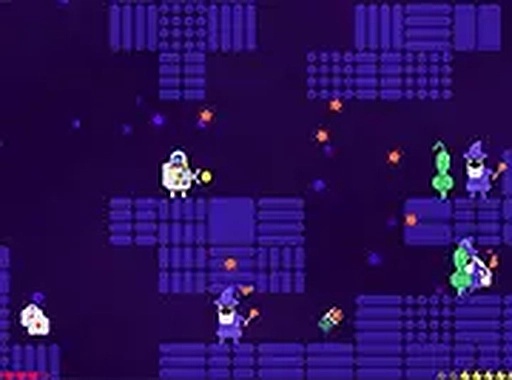
Cosmic Trek: A Family Platformer places players in the boots of a lone astronaut who has crash-landed in a nebula where the laws of physics take a backseat to imagination. Here, glowing wizards fling colorful spells, and alien creatures roam the floating islands. The setting merges science fiction with fantasy, creating a world that feels both strange and inviting. Each level presents a new corner of this nebula, with platforms that shift and hazards that require careful observation.
Core Movement and Timing
Players control their character using standard keyboard inputs: arrow keys or WASD for lateral movement, and the spacebar or up arrow to jump. The core challenge lies in timing each leap to avoid the unpredictable patterns of wizard projectiles and alien dashes. There are no combat mechanics; instead, success depends on precise navigation from the start of a level to its end. The controls are responsive and designed for quick adjustments, making each attempt feel fair.
Collectibles and Progression
Scattered across each stage are glowing items that serve two purposes. Collecting them increases the player’s score, and in some cases, they may unlock alternative routes or shortcuts. The game encourages exploration within the confines of the level design, rewarding players who take the time to gather these items rather than rushing to the finish. Progress is saved automatically, allowing players to step away and return without losing their place.
Visual Style and Atmosphere
The graphics are colorful and cartoonish, with a palette that emphasizes bright blues, purples, and greens to evoke a cosmic feel. Character designs are friendly and exaggerated, ensuring that even the wizards and aliens appear more mischievous than threatening. The background animations, such as drifting stars and floating debris, add depth without distracting from the gameplay. This visual approach keeps the experience light and accessible for younger players.
Strategies for Success
Each hazard in the game follows a repeating pattern. Taking a moment to observe these patterns before moving can save time and frustration. Quick reflexes are helpful, but patience and careful positioning often yield better results. Since the game saves progress automatically, players can treat each level as a short puzzle to solve rather than a test of endurance. Collecting items early may reveal hidden paths that make later sections easier.




Player comments
Sign in to comment
You must be logged in before posting a review or rating.
No account? Create one
No comments yet. Be the first to comment!